

Time management for a busy mom is less about squeezing in more and more about getting the remembering out of your head. Plan the day the night before, block your week around fixed commitments, make every task someone's named job, and put reminders and schedules in one place so you aren't the only system holding it together. That last part is what Elle, the AI assistant in Momentality, is built to take on.
TL;DR
- Write down the four to six things that matter most tomorrow, the night before.
- Build your week around fixed commitments, travel time included, and review it once a week.
- Give each task one owner, and hand over the remembering, not just the doing.
- Keep calendars, emails and school schedules in one place, so reminders arrive without you chasing them.
- Aim for a structured but flexible week, not a perfect one.
Table of Contents
- Why your day feels full before it starts
- Plan the night before
- Build the week around fixed commitments
- Give every task one owner
- Use reminders that work for you
- A sample day, simplified
- Let Elle carry the remembering
- FAQ
- Sources
Why your day feels full before it starts
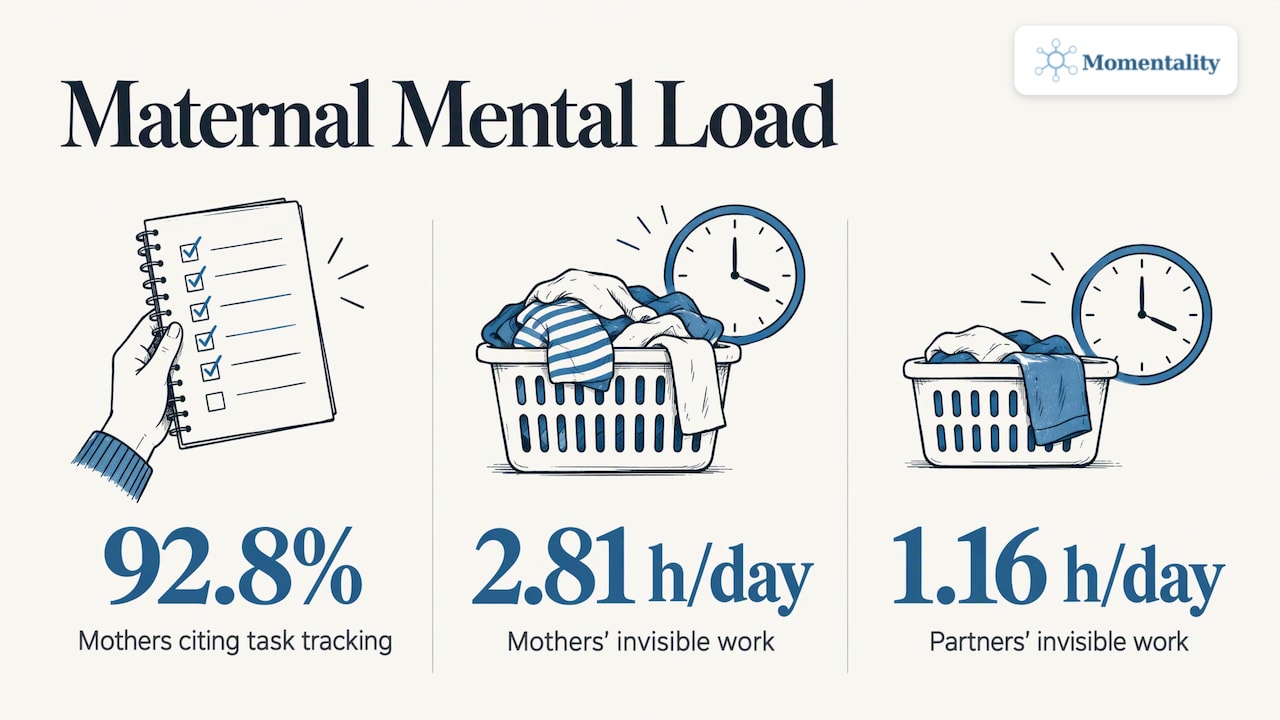
The problem is rarely the hours. It is the constant tracking. In a 2026 PLOS One study of 1,871 mothers, 92.8% named constantly thinking about tasks as the main cause of their mental load. The mothers reported about 2.81 hours a day of unpaid "invisible" work, against 1.16 hours for their partners.
A 2025 study of 2,133 U.S. parents found that mothers' jobs and earnings reduced the physical housework they did, but not the cognitive burden of planning and remembering. So a better to-do list alone won't fix it. You need a way to move the tracking out of your head.
Plan the night before
The simplest habit with the biggest payoff is a five-minute evening plan. UMass Memorial Health recommends listing the four to six most important tasks each night, breaking big projects into smaller chunks, and scheduling them in time blocks.
Mississippi State University Extension adds the practical part: lay out clothes and pack lunches the night before, and group similar tasks so you aren't switching gears all day.
A workable evening routine:
- Check tomorrow's calendar for anything that changed.
- Pick your top tasks, no more than six.
- Prep what you can: bags, lunches, forms to sign.
- Note who is doing pickup and who is covering the gap if you are in a meeting.
Build the week around fixed commitments
Start with what cannot move: work meetings, school hours, practices, appointments. Then add travel time. A weekly family schedule guide gives a clear example: a 4:00 appointment really affects your schedule from about 3:20 to 5:15 once you count getting there and back.
After that, layer in flexible work:
- Protect two or three work blocks and treat them like appointments.
- Plan the easiest meals for the busiest days. Leave the elaborate dinners for the calm ones.
- Choose a few ten-minute reset times for tidying rather than one big cleanup.
- Do a 15-minute weekly review to see what worked and change one thing.
If kids' devices are eating into those blocks, it helps to have a plan for them too. This kids' screen time plan for ages 10 to 13 fits neatly into a schedule with protected time for rest.
Give every task one owner
Delegating works when the whole task moves, including remembering it. The American Psychological Association advises delegating with clear expectations and simplifying your list to the highest priorities. It also says plainly that perfect work-home balance is a myth, so aim for a structured but flexible schedule.
In practice:
- Name one person per task: "Caregiver B: soccer drop-off at 4:40."
- Add a backup, such as a freezer meal if dinner plans change.
- Ask older kids to take age-appropriate jobs. Our family chore schedule guide shows how to build one that lasts.
- If you share custody or rely on grandparents, agree on who sees what. Our guides to a shared custody calendar and shared calendar permissions walk through it.
This matters because assigned tasks tend to stick to mothers by default. Researchers call it "gendered cognitive stickiness." Naming owners out loud is how you loosen it.
Use reminders that work for you
Reminders fail in two ways. Too few, and you miss the dentist. Too many, and you swipe them all away. A few rules keep them useful:
- Reminders for deadlines, calendar for time slots. A task with a due date and an event with a start time are different things.
- One reminder, set at the right moment. For a school event, one note the evening before often beats five pings a week out.
- Tie reminders to places. "Pick up the permission slip" is most useful when you are near the school. Here is how location-based reminders work for families.
- Keep everything in one calendar. Appointments scattered across email, texts and paper are the ones that get missed. See how to keep track of family appointments in one place.
If conferences are the crunch, our guide to parent-teacher conference scheduling for working parents helps you fit them around your workday.
A sample day, simplified
| Time | Anchor | What it protects |
|---|---|---|
| Evening, 5 minutes | Tomorrow's top tasks and prep | A calm morning |
| Morning | Quick look at the day's schedule | No surprises at pickup |
| Midday | One protected work block | Your most demanding task |
| Early evening | One ten-minute reset | A tidy house without a big cleanup |
| Weekly, 15 minutes | Review the week ahead | Fewer conflicts |
Your own anchors will differ. The point is to have a few, and to keep them boring and repeatable.
Let Elle carry the remembering
Every habit above works, but each one still asks you to do the tracking. Elle is Momentality's AI assistant. It brings your calendars, emails and school and sports schedules into one interface, so you don't have to juggle several tools.
Elle is designed to work proactively: it anticipates plans, catches conflicts and adjusts schedules, and it reminds you of what matters without constant input from you. Contextual morning briefs give you the day at a glance. You can talk to Elle by voice or text, and location-based reminders arrive where they are useful.
It also supports the people around you. Partners, grandparents and other caregivers can follow the schedule without paying, and you keep privacy controls over what they see. That makes it a good fit for working moms, single moms with several kids, military spouses, divorced co-parents and grandparents who want to be part of the activities.

If you want to try it, join as a Founding Member and see how Elle fits your week.
FAQ
What is the best time management method for a busy mom?
Start with a nightly plan of four to six priorities and a weekly schedule built around fixed commitments. Add time blocks for work and a short weekly review. Simple, repeatable anchors beat an elaborate system you won't keep up.
How do I stay organized as a mom without feeling overwhelmed?
Move the tracking out of your head. Keep one shared calendar, give every task a named owner, and prep the night before. Accept a structured but flexible week rather than a perfect one.
How do I use reminders without getting overloaded?
Use reminders for tasks with deadlines and the calendar for time slots. Set one well-timed reminder per item, and tie errands to locations when you can. Fewer, better-timed alerts are the ones you act on.
Can grandparents or co-parents see the schedule too?
Yes. With Momentality, invited partners, grandparents and caregivers can view and follow the family schedule without paying, and the primary user keeps privacy controls.
Sources
- Tips for Working Parents: Managing Your Time, UMass Memorial Health
- Tips for Parents: How to Make the Most of Your Time, Mississippi State University Extension
- How working women can manage work-life balance, American Psychological Association
- Mental load in women and mothers, PLOS One
- Take a Load Off? Not for Mothers, SAGE
- How to Create a Weekly Family Schedule: 8 Simple Steps